Ценови радарPrice Radar
Python
Инструментът зад услугата отгоре. Чете цената през няколко слоя — Shopify JSON, JSON-LD, OpenGraph, microdata и накрая CSS селектор — така че работи на повечето магазини без ръчна настройка за всеки сайт поотделно. Разпознава и българския, и английския запис на числата, включително зачертаните стари цени, които обикновено подвеждат такива скриптове. Изходът е форматиран Excel с маркирана най-ниска цена и колона с разликата.
The tool behind the service above. It reads prices through several layers — Shopify JSON, JSON-LD, OpenGraph, microdata and finally CSS selectors — so it works on most shops without per-site configuration. It handles both Bulgarian and English number formats, including the struck-through old prices that usually mislead scripts like this. Output is a formatted Excel file with the lowest price highlighted and a gap column.
PythonBeautifulSoupopenpyxlPlaywrightJSON-LD
ScrapeFlow Chrome MV3AI
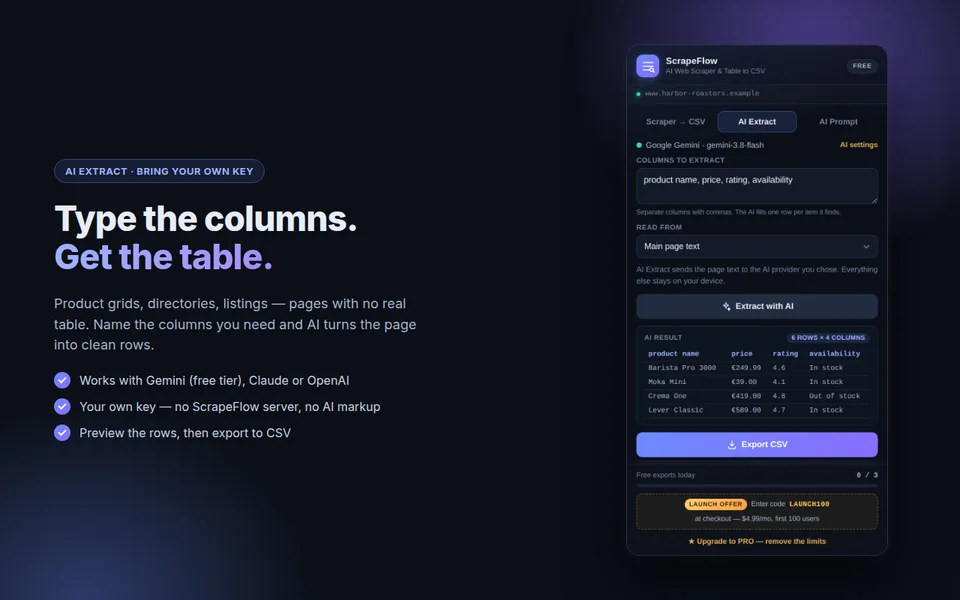
Разширение за Chrome, публикувано в Chrome Web Store. Извлича таблици и списъци от страница в чист CSV, а с AI Extract пишете колоните, които ви трябват, и AI превръща страница без таблица — продуктова решетка, каталог, обяви — в подредени редове. Работи със собствен ключ за Gemini, Claude или OpenAI: заявката отива директно при доставчика, без мой сървър. CSV с UTF-8 BOM, за да се отваря правилно с кирилица в Excel. Безплатен режим с дневен лимит и PRO план.
A Chrome extension published in the Chrome Web Store. It turns tables and lists into clean CSV, and with AI Extract you type the columns you need and AI turns a page with no real table — a product grid, a directory, listings — into tidy rows. It runs on your own Gemini, Claude or OpenAI key: the request goes straight to the provider, with no server of mine in between. CSV with a UTF-8 BOM, so non-Latin text opens correctly in Excel. Free tier with a daily limit and a PRO plan.
Вижте в Chrome Web Store →See it in the Chrome Web Store →
ПодробноMore details
Как работи
How it works
- Отваряте страницата с данните и кликвате иконата на ScrapeFlow.
- Таб „Scraper → CSV“ сам намира таблиците и списъците. За страница без таблица отваряте „AI Extract“ и пишете колоните, например „име, цена, наличност“.
- Преглеждате редовете и сваляте CSV, който се отваря правилно в Excel.
- Open the page with the data and click the ScrapeFlow icon.
- The “Scraper → CSV” tab finds tables and lists by itself. For a page with no table, open “AI Extract” and type the columns, for example “name, price, stock”.
- Check the rows and download a CSV that opens correctly in Excel.
Цени
Pricing
- Безплатно: 3 експорта на ден и до 12 000 знака текст към AI.
- PRO: $9.99 на месец или $79 на година — без дневен лимит и до 60 000 знака към AI.
- С код
LAUNCH100 PRO е $4.99 на месец за първите 100 потребители.
- Free: 3 exports a day and up to 12,000 characters of text sent to AI.
- PRO: $9.99 a month or $79 a year — no daily limit and up to 60,000 characters sent to AI.
- With the code
LAUNCH100, PRO is $4.99 a month for the first 100 users.
Вашите данни
Your data
Таблиците се обработват в браузъра ви. При AI Extract текстът на страницата отива директно при доставчика, който сте избрали (Google, Anthropic или OpenAI), с вашия ключ — не минава през мой сървър. Няма анализи и проследяване. Gemini има безплатен план, но при него Google може да използва заявките, за да подобрява услугите си.
Tables are processed in your browser. With AI Extract, the page text goes straight to the provider you chose (Google, Anthropic or OpenAI) with your key — it never passes through a server of mine. No analytics, no tracking. Gemini has a free tier, but on it Google may use requests to improve its services.
Работи само със страници, които сте отворили сами. Не заобикаля логини, CAPTCHA или защити.
It only works on pages you have opened yourself. It does not get around logins, CAPTCHAs or other protections.
Manifest V3JavaScriptGemini · Claude · OpenAIExtensionPay
AI Product Writer WooCommerce
Плъгин за WordPress, който пише описания на продукти директно в екрана за редакция — по заглавие, категории и характеристики, в избран тон, с вмъкване и в Classic, и в Gutenberg. API ключът се пази криптиран с AES-256-GCM, с ключ изведен от солите на сайта; ако солите се сменят, плъгинът го разпознава и подканя да бъде въведен наново, вместо да гръмне с неясна грешка.
A WordPress plugin that writes product descriptions inside the edit screen — from the title, categories and attributes, in a chosen tone, inserting into both Classic and Gutenberg. The API key is stored encrypted with AES-256-GCM under a key derived from the site salts; if the salts change, the plugin detects it and asks for the key again instead of failing with an opaque error.
PHPWordPressWooCommerceAES-256-GCMAnthropic API
LeadForge микро-SaaSmicro-SaaS
Превръща „ниша + град" в готова база с фирми: намира местните бизнеси през OpenStreetMap и Google Places, обогатява ги с публични телефони и имейли, прави технически одит на сайтовете им — HTTPS, мобилна версия, скорост — и експортира в CSV, JSON или Excel. С HTTP API, фонови задачи през Celery и Docker разгръщане.
Turns "niche + city" into a campaign-ready company list: finds local businesses via OpenStreetMap and Google Places, enriches them with public phones and emails, runs a technical audit of their sites — HTTPS, mobile, speed — and exports to CSV, JSON or Excel. With an HTTP API, Celery background jobs and Docker deployment.
FastAPISQLAlchemy 2.0CeleryDockerasyncio
Превод на презентацииSlide & document translation
BG ↔ EN
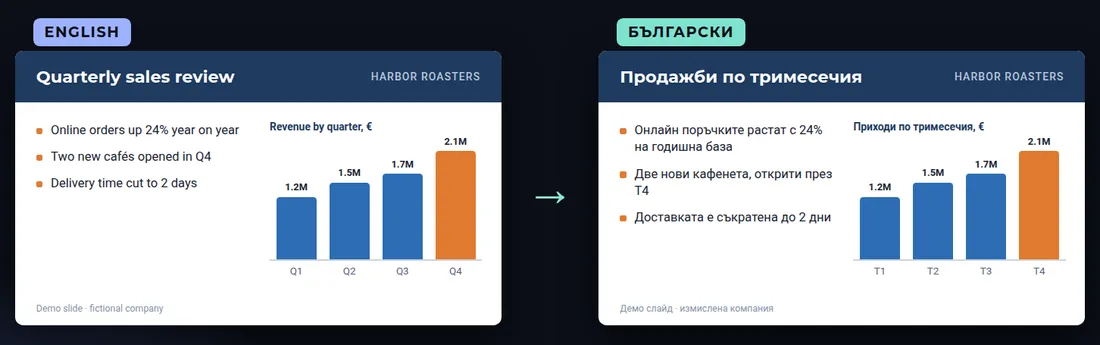
Превод на PowerPoint и Word между български и английски, като файлът остава същият: дизайн, шрифтове, графики и бележки на презентатора. Текстът в картинките и диаграмите се прерисува на новия език, а всеки слайд се проверява дали преводът се побира — българският е с около 20% по-дълъг. Български е родният ми език. Не правя заклети преводи.
PowerPoint and Word translation between Bulgarian and English that keeps the file as it is: design, fonts, charts and speaker notes. Text inside images and diagrams is recreated in the new language, and every slide is checked for text that no longer fits — Bulgarian runs about 20% longer. Bulgarian is my native language. Not for certified or sworn translations.
ПодробноMore details
Как протича
How it goes
- Изпращате файла (.pptx или .docx) и посоката на превода.
- До 24 часа потвърждавам обема и кой текст в картинките ще се прерисува.
- Превеждам, прерисувам текста в картинките и проверявам всеки слайд.
- Получавате същия файл на другия език и кратък списък с места, които си заслужава да прегледате.
- You send the file (.pptx or .docx) and the direction of the translation.
- Within 24 hours I confirm the scope and which text inside images will be recreated.
- I translate, recreate the text inside images and check every slide.
- You get the same file in the other language, plus a short list of spots worth a second look.
Срокове и цена
Timing and price
От 2 до 5 дни според обема. Пакетите са в Upwork — от $30 за до 10 слайда. За по-голям файл пишете ми за оферта.
2 to 5 days depending on size. Packages are on Upwork — from $30 for up to 10 slides. For a larger file, message me for a quote.
Поверителност
Confidentiality
Не споделям файловете ви и ги изтривам след предаване, ако поискате. Не правя заклети и нотариални преводи — за тях е нужен заклет преводач.
I don't share your files and I delete them after delivery if you ask. I don't do sworn or notarised translations — those need a sworn translator.
PowerPointWordBG nativeLocalization